¶ Payment Method
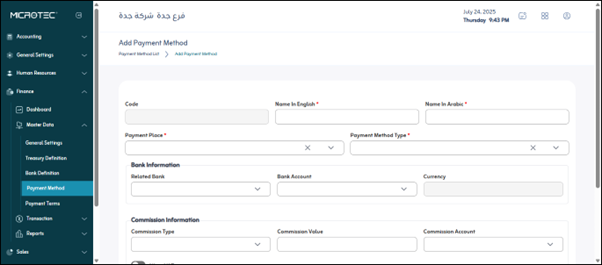
Usage: This screen is used to add a new payment method that can be linked to purchases, sales, or payroll transactions, and to define its characteristics.
¶ Navigation Path
Finance Module > Master Data > Payment Methods
¶ Preconditions
The user must have the necessary permissions to access the Payment Methods section.
¶ Fields in Screen:
- Name: The name of the payment method, such as “Bank Transfer - AlAhli” or “Cash Payment.”
- Code: A unique code or number for the payment method to facilitate search and identification.
- Payment Method Type: Specifies the type of payment method (cash, check, bank transfer, card, etc.).
- Payment Center: Determines the center responsible for executing the payment (treasury or bank).
¶ Bank Information
- Related Bank: If the payment method is a bank, specify the linked bank.
- Bank Account: The bank account used for payment or receipt.
- Currency: The currency used for this method (SAR, USD, etc.).
¶ Commission Information
- Commission Type: The type of commission charged (fixed or percentage).
- Commission Amount: The amount of the commission applied (for example, 10 SAR or 2%).
- Commission Account: The accounting account to which the commission is recorded.
- VAT Allow: Activate this option if the commission is subject to VAT.
Save: Save the new payment method.
Cancel: To cancel the operation and not save the entered data.