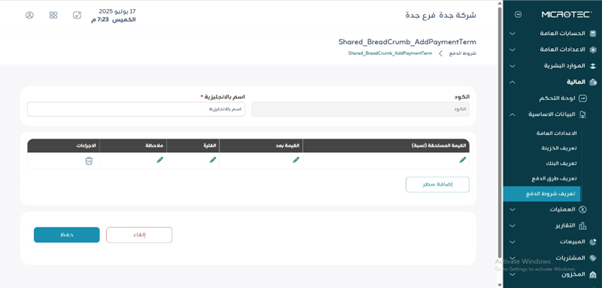
¶ Payment Terms
Usage: This screen is used to define the payment terms that apply to sales or purchase invoices, such as:
Will payment be in cash?
Will payment be made 30 days after the invoice?
Will payment be made in installments (e.g., 50% upon order and 50% upon delivery)?
¶ Fields
- Code: A unique code or number used to identify a payment term for easy search and identification.
- Name in English: Enter the name of the payment term to be defined in the system.
- Amount Due (Percentage): The percentage to be paid for this term (e.g., 50%).
- Amount After: How many days after the invoice or receipt date should payment be made? (e.g., after 30 days).
- Period: A unit of time (day, week, month), often using “day.”
- Note: Additional explanatory notes (optional).
- Actions: To edit or delete a row from the table.
- Add Row Button: Used to add a new term within the same payment definition.
¶ Example
- Line 1: 50% on invoice
- Line 2: 50% after 30 days
Save: To save the new payment term.