¶ Bank Account Statement
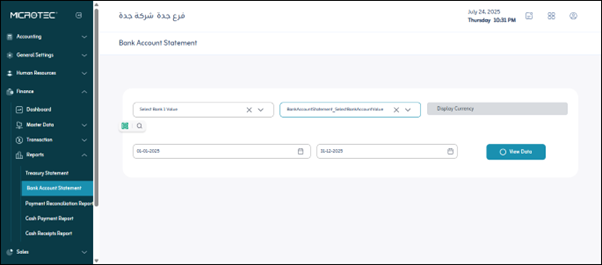
Usage: The screen allows you to view and print all financial transactions made in your bank account over a specific period of time.
¶ Prerequisites for Using the Screen
- The user must have access to the bank statement report.
- At least one bank and one bank account must be defined in the system.
- The relevant financial transactions (payments, daily entries, and fund transfers) must be pre-recorded in the system.
¶ How to Use the Screen
To use the screen, follow these steps:
- Bank Value: From the drop-down menu, select the bank for which you want to view the account statement.
- Bank Account Statement: Ensure this option is selected; it indicates that you are requesting a bank statement.
- Currency: This field will automatically display the currency for the selected bank account, so you do not need to enter it manually.
- Time Period: Select the period for which you want to view account transactions. You can usually choose a start and end date.
- View Data: After entering all the required options, click this button to view the account statement. The data will appear at the bottom of the screen.
- Print: After viewing the data, you can click this button to print the account statement.
¶ Explanation of Fields Appearing After Viewing Data
After clicking “View Data,” you will see the details of the financial transactions in the following table:
- Date: The date the financial transaction occurred.
- Transaction Code: A unique identification number for each financial transaction.
- Transaction Name: A brief description of the transaction type (e.g., deposit, withdrawal, transfer, bill payment).
- Incoming/Outgoing: Indicates whether the transaction represents an amount entering the account (incoming) or leaving it (outgoing).
- Balance: The current balance of the account after each financial transaction.
- Payment Method: The payment method used for the transaction (e.g., cash, check, bank transfer, credit card).
- Source: The party that initiated the transaction or its beneficiary.
- Journal Entry: The journal entry number associated with the transaction in the accounting system (important for accountants).
- Paid By: Indicates the party who made the payment if the transaction is an “outgoing” transaction.
- Related General Account: The general accounting account to which this transaction is linked (e.g., expense account, revenue account).
- Description: A general description of the transaction that outlines its key details.
- Detail Description: A more detailed description of the transaction, which may include additional information not included in the general “Description.”