¶ Payment in report
Usage: This report displays a comprehensive list of all receivables (incoming amounts) recorded in the system over a specific period of time or according to specific clearance criteria. This helps review revenue, track payments received from customers, and verify incoming cash flows.
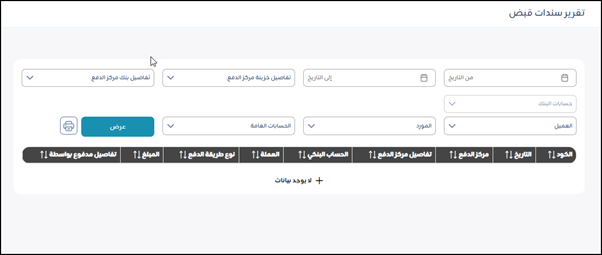
The screen consists of a search and filter section at the top, and a section for displaying column headers for results at the bottom.
Search and Filter Elements (Top Sections):
These fields help you define the range of data you want to display in the report.
Time Period:
- From Date: Specifies the start date of the period for which you want to display the receivables.
- To Date: Specifies the end date of the period for which you want to display the receivables.
- Bank Accounts: A drop-down list to select a specific bank account into which payments were received.
- Customer: A search/selection field to select a specific customer if the receivables relate to payments from them.
- Vendor: A search/selection field to select a specific vendor if the receivables relate to cash returns or a specific settlement with a vendor.
- General Accounts: A search/selection field to select a specific general ledger account (such as a sales revenue account) if you want to filter the receivables associated with that account.
- Payment Center Treasury Details: Appears as a field to specify additional details about the treasury or cost center associated with the receivable.
- Payment Center Bank Details: Appears as a field to specify additional details about the bank or cost center associated with the receivable.
- Action Buttons:
- View: After specifying the filter criteria, click this button to view the report. The results will appear at the bottom of the screen (currently no data).
- Print Button (Printer Icon): To print the report after viewing it.
Results Display Area/Column Headings:
These are the main headings for the data that will appear in the report after clicking “View.” They appear arranged from right to left (depending on the Arabic language):
- Code: The identification number of the receipt voucher.
- Date: The date the receipt voucher was issued.
- Payment Center: This may refer to the revenue center or the entity from which the payment is made.
- Payment Center Details: A description or additional details about the payment center.
- Bank Account: The name of the bank account or treasury where the payment was made.
- Currency: The currency of the amount received.
- Payment Method Type: The method of collection (cash, check, transfer, etc.).
- Amount: The total amount received for this voucher.
- Paid By Details: A description or additional details about the party making the payment.