¶ Payment Out Report
Usage: This report displays a comprehensive list of all disbursements (outgoing payments) recorded in the system over a specific period of time or according to specific filtering criteria. This helps review expenses, track payments to suppliers or customers (for example, returns), and verify cash outflows.
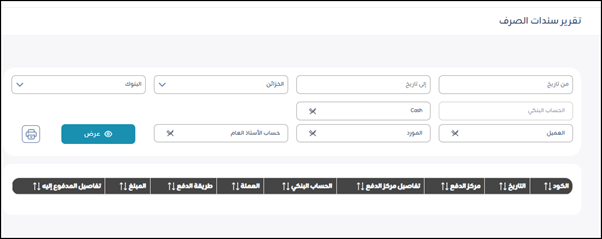
Search and Filter Elements:
These fields help you define the range of data you want to display in the report.
Time Period:
- From Date: Specifies the start date of the period for which you want to display disbursements.
- To Date: Specifies the end date of the period for which you want to display disbursements.
Banks/Treasuries:
-
Banks: A drop-down list to select the bank from which the disbursements were issued.
-
Treasuries: A drop-down list to select the treasury (cash fund) from which the disbursements were issued.
-
Bank Account (Cash): A field that allows you to select a specific bank account or “Cash” if you want to filter disbursements by the specified payment source.
-
Customer: A search/selection field to select a specific customer if the disbursements are for payments to them (such as cash returns to a customer).
-
Vendor: A search/selection field to select a specific vendor if the disbursements are for payments to them.
-
General Ledger Account: A search/selection field to select a specific general ledger account (such as a specific expense account) if you want to filter disbursements associated with that account.
-
View: After specifying the filter criteria, click this button to view the report. The results will appear at the bottom of the screen.
-
Print button (printer icon): To print the report after viewing it.
Results display area / column headers:
These are the main headings for the data that will appear in the report after clicking “View.” They appear arranged from right to left (depending on the Arabic language):
- Code: The identification number of the disbursement voucher.
- Date: The date the disbursement voucher was issued.
- Payment center: This may refer to the cost center or the entity incurring the disbursement.
- Payment center details: A description or additional details about the payment center.
- Bank account: The name of the bank account or vault from which the disbursement was made.
- Currency: The currency of the disbursed amount.
- Payment method: The disbursement method (cash, check, transfer, etc.).
- Amount: The total amount disbursed on this voucher.
- Payee details: A description or additional details about the party to whom the disbursement was made.