¶ Payment reconciliation report
Usage: This screen displays a detailed report showing the relationship between payments made and invoices settled (paid or settled) with those payments. This helps verify that all payments have been correctly assigned to the appropriate invoices, and identify any invoices that have not yet settled or payments that have not been linked.
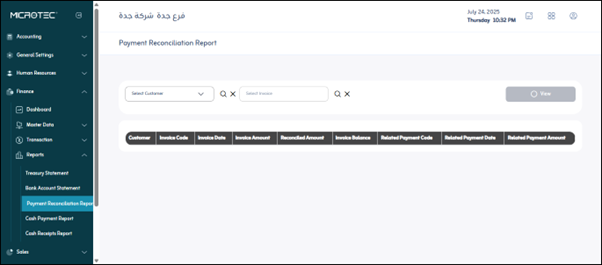
- Select Invoice: This is a search/select field that allows you to search for or select a specific invoice (most likely by invoice number or code) to view its settlements.
- Select Customer: This is a search/select field that allows you to search for or select a specific customer to view all their payment and invoice settlements.
- The columns for the data that will appear when you click “View” appear horizontally, arranged as buttons or categories, and are likely arranged from right to left. They are as follows:
- Customer: The name or code of the customer with whom the payment/invoice was made.
- Invoice Code: The invoice’s identification number or code.
- Invoice Date: The date the invoice was issued.
- Invoice Amount: The total value of the invoice.
- Matched Amount: The portion of the invoice that was matched or settled by payment. (For example, if the invoice is for 1,000 and 500 is paid, the matched amount is 500.)
- Invoice Balance: The remaining amount of the invoice that has not yet been paid (if the matched amount is less than the invoice amount).
- Associated Payment Code: The identification number or code for the payment transaction (which was settled with the invoice).
- Associated Payment Date: The date the payment occurred.
- Associated Payment Amount: The financial value of the payment transaction associated with the invoice.