¶ Treasury Statement
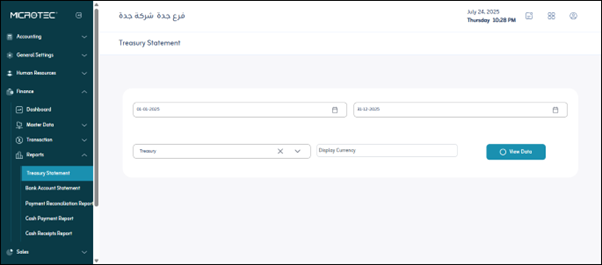
Usage: The screen is used to review all financial transactions (incoming and outgoing) made through a specific treasury over a specific period of time.
¶ Filters
- From Date / To Date: Specify the search period within which you want to view transactions.
- Treasury: Specify the name of the treasury (e.g., main cashier, branch cashier, etc.).
- Currency: The currency used in transactions (Saudi Riyals, US Dollars, etc.).
- “View Data” button: Displays results based on the entered filters.
- “Print” button: Prints the displayed report in formats ready for archiving or signature.
¶ Explanation of the Results Table
- Date: The date on which the financial transaction was executed.
- Transaction Code: A reference code for the financial transaction (linked to the accounting entry system).
- Transaction Name: The type of transaction (e.g., disbursement, receipt, transfer, etc.).
- Incoming: The amount that entered the treasury (increase in balance).
- Outgoing: The amount that left the treasury (decrease in balance).
- Balance: The remaining balance after executing the transaction.
- Payment Method: The method used (cash or other).
- Source: The entity from which the transaction was executed (e.g., “shipping and forwarding”).
- Accounting Entry: The journal entry number associated with the transaction.
- Paid by: The party who paid the amount, if applicable.
- Account Name: The accounting account affected by the transaction.
- Description: A brief description of the nature of the transaction.
- Detail Description: A button to view more details, if necessary.