¶ Assets
¶ Usage
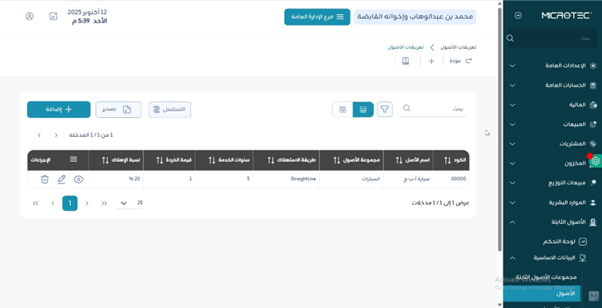
Use this screen to define and register fixed assets with all key financial and operational details (group, location, responsible employee, depreciation settings, and cost center).
It supports managing the asset lifecycle from acquisition to depreciation and final retirement (disposal).
¶ Fields Description
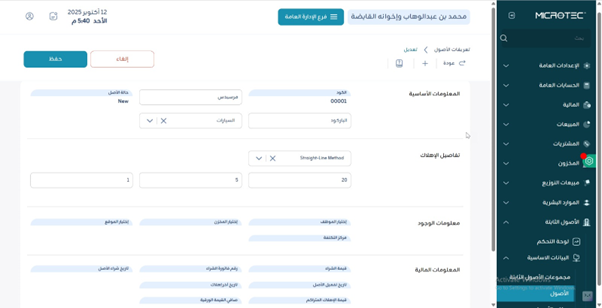
- Asset Code: Unique identifier (auto- or manual).
- Asset Name: Full descriptive name (e.g., “Forklift Model X”, “Office Desk No. 12”).
- Asset Group: Applies unified accounting/depreciation rules (e.g., Vehicles, Office Furniture, IT Equipment).
- Acquisition Date: The date purchased or ready for use.
- Acquisition Cost: Original cost (purchase, freight, installation, etc.).
- Depreciation Method: Straight-line, declining balance, or as per policy.
- Useful Life: In years or months (e.g., 5 years / 60 months).
- Salvage Value: Expected residual value (if any).
- Depreciation Start: Date from which depreciation begins.
- Asset Location: Warehouse/branch/physical site (e.g., Main Warehouse – Tools, HQ – 3rd Floor).
- Responsible Employee: Person accountable for the asset.
- Cost Center: If enabled, links expense allocation to the proper center (e.g., Production, Admin, Project Alpha).
- Asset Status: Lifecycle state (e.g., New, In Use, Suspended).
- Serial Number / Tag: For tracking and audits when available.
- Attachments: Purchase invoices, warranty, photos.
- Notes: Extra information (e.g., extended warranty, special maintenance).
¶ Actions
- Add: Create a new asset and complete required fields.
- Edit / Delete: Update or remove records (subject to usage/permissions).
- Activate / Deactivate: Control operational availability.
- Preview Depreciation: Review schedule before posting.
- Post Depreciation: Record periodic depreciation (if accounting is enabled).
- Transfer Asset: Move between locations/warehouses/cost centers.
- Retire / Dispose: End lifecycle with correct accounting treatment.
- Export: Download asset lists for audit/analysis.
¶ System Behaviors
- Validation: Changing depreciation settings after posting may be restricted or require adjustments.
- Integration: Depreciation postings follow GL mapping defined for the asset group.
- Audit Trail: All changes retain user and timestamp.
- Permissions: Add/Edit/Post/Retire actions respect roles and approvals.
¶ Expected Outcomes
- Asset master data is registered with complete depreciation settings.
- Depreciation schedule can be previewed and posted periodically.
- Transfers/retirements update locations and book values correctly.
- Reports reflect asset counts, locations, book values, and history.