¶ Currency Conversion
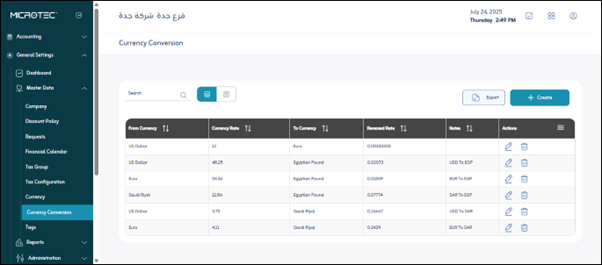
Usage: The Currency Conversion screen is a vital tool in financial systems that handle transactions in different currencies. This screen enables you to define and manage exchange rates between two currencies, ensuring accurate conversion of financial values when conducting transactions such as sales, purchases, or settlements in a currency other than the system’s base currency.
¶ Fields
- From Currency*: The originating currency to convert from.
- Exchange Rate*: The numerical value of the exchange rate of the “From” currency against the “To” currency.
- To Currency*: The target currency to convert to.
- Reciprocal of Exchange Rate: The automatically calculated value of how much one unit of the “To” currency is equal to the “From” currency.
- Notes: An optional field to add additional details about the exchange rate.
¶ Available Actions
- Edit: To change the details of an existing exchange rate.
- Delete: To remove a specific exchange rate from the system.
- Export: To export the displayed exchange rate list to an external file.
Save: To save the currency conversion settings or changes to currencies.