¶ Discount policy
Usage: The “Discount Policy” screen allows users to manage and organize the various discount policies that can be applied to customers or products in the system. This screen allows users to create, modify, and delete discount rules that can later be applied to invoices or sales orders.
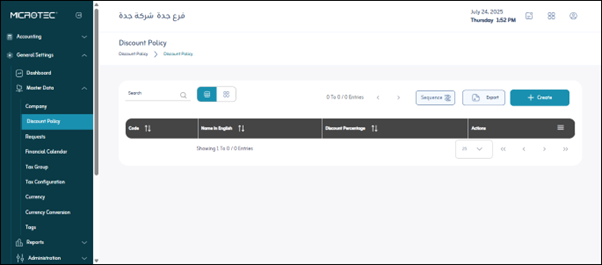
¶ Sequence Settings
These settings are used to determine how entries are automatically numbered:
-
Allowed: Indicates whether the system will allow manual entry numbering or will rely solely on automatic sequencing.
-
Sequence Applies to:
- Company: The sequence is company-wide.
- Branch: The sequence is specific to each branch within the company.
- Unit: The sequence may be at the level of a specific organizational unit within the branch.
- Screen: The sequence only applies to entries entered from this screen.
-
Sequence Type:
- Annual: The sequence resets to 1 at the beginning of each fiscal year.
- Monthly: The sequence resets to 1 at the beginning of each month.
- Daily: The sequence resets to 1 at the beginning of each day.
- Continuous: The sequence continues to increment without resetting based on a time period.
-
Export: This option allows you to export the discount policy data in the screen to an external file, typically Excel or PDF, for analysis or record keeping.
-
Note: Please add the sequence first before adding a new discount policy.
¶ After clicking the “Add” button
- Code: A unique code for the discount (e.g., SALE10)
- Name: A description of the discount (e.g., “10% off for the season”)
- Discount Rate: The percentage value of the discount (e.g., 10%)
- Action: Apply or modify the discount
Save: After entering the previous fields, the user clicks “Save” to save the discount policy data.